How to Turn Cooking Videos Into Recipe Shorts
You filmed a 40-minute cook: prep, the sear, the sauce, plating, the first bite. Your long video is on YouTube. Now you want the recipe as a 60-second Short, the sizzle as a TikTok, and maybe a "3 dinners this week" Reel. That means going back through every take to find the money shots.
People do cook from short videos. In a survey of 406 TikTok users reported by Tubefilter, 97% said they had followed a recipe they found on TikTok. And the best cooking moments are visual: the knife going through the crust, the cheese pull, the pan catching fire. ClipMaster finds moments from the picture, not just the transcript, so it finds those even when you weren't talking.
The Short Answer
- Upload the full cook (up to 90 minutes per file).
- Filter to How-to clips and search for the shots: "cheese pull", "pouring the sauce", "cutting into the steak".
- Turn the steps into one Tutorial: result first, then numbered steps.
- Add captions with the measurements, and a translated second line for viewers abroad.
- Export vertical and schedule a recipe a day to YouTube.
What One Cooking Video Gives You
| Short | What it shows | How to build it |
|---|---|---|
| The full recipe in 60 seconds | Finished dish, then each step | Compilation, Tutorial structure |
| The money shot | Cheese pull, sear, slice, pour | One clip, slowed down, zoom in |
| The tip | One technique: how to dice an onion fast | A How-to clip with captions |
| The loop | A satisfying moment that replays | Compilation, Loop structure |
| Weekly round-up | Best moments from several videos | Compilation across projects, Best-of |
Step 1: Upload the Cook
Upload MP4, MOV or AVI files up to 90 minutes and 5 GB, several at once. Already posted the long version? On a paid plan, paste the YouTube link instead.
Step 2: Find the Steps and the Money Shots
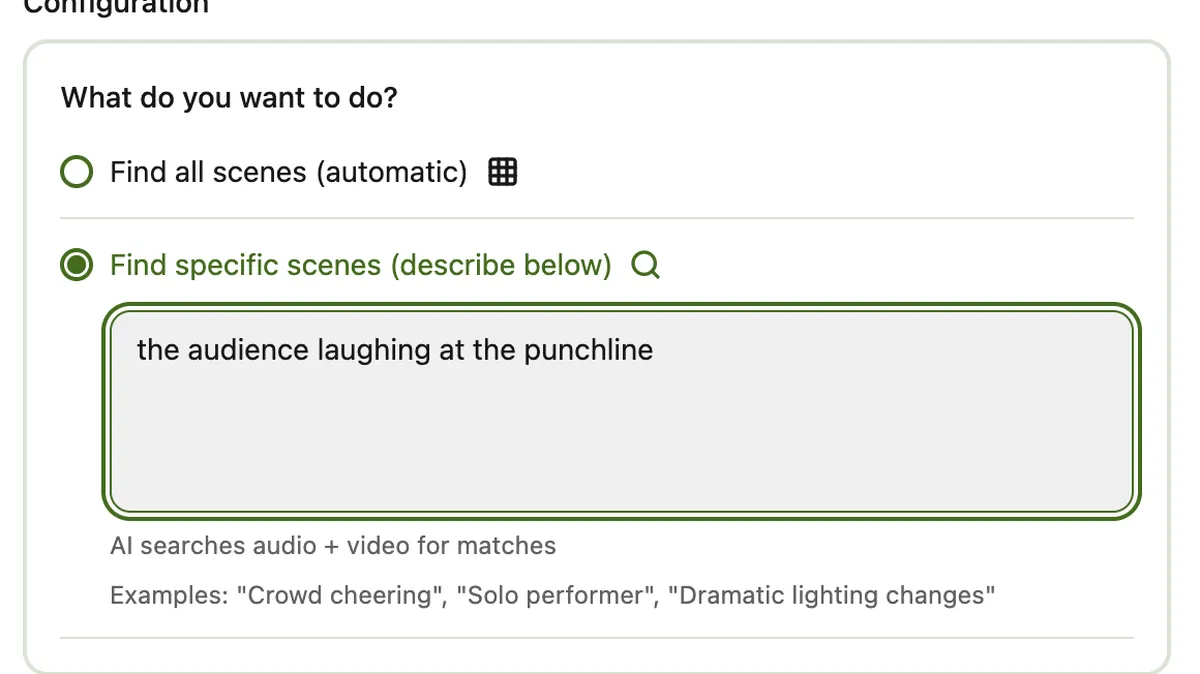
Every clip comes back labelled with a type (Highlight, Story, How-to or Transition), a virality tier (Hot, Warm or Neutral) and a description. Filter to How-to to see the steps. Then search for the shots you want in plain words; ClipMaster searches the picture and the sound together:
- "cheese pull"
- "pouring sauce over the pasta"
- "knife cutting into the steak"
- "flames in the pan"
- "first bite reaction"
Step 3: Build the Recipe as a Tutorial
A recipe Short works best when it shows the finished dish first, so the viewer knows why to stay. On a paid plan, put your step clips into a compilation and pick the Tutorial structure: it opens with the result, then plays the steps with numbered step badges on screen. Pick Loop for a satisfying clip that ends on the frame it started, so it replays without a seam.
Then press Auto-edit. It writes the text cards (font, size, position, timing), picks a background track, and can speed up the waiting (simmering, resting, the oven) and slow the money shot. More on the format: how to make a compilation video.
Step 4: Captions That Carry the Recipe
Many people watch with the sound off, so the captions have to carry the amounts. Pick one of 15 caption styles and click any word to fix it: "200 g", "tbsp", "gochujang", the dish's real name. Drop an emoji on a word (🔥 on the sear). On paid plans, add a second caption line translated into one of 21 languages, so one video works for viewers in another country.
Why it matters: do captions increase video views?
Step 5: Make Food Look Good on a Phone
- Zoom: glide in on the pan over up to 10 seconds, aimed at any of 9 points, from 1.05× to 2.5×.
- Speed: slow the pour to 0.5×, speed up chopping to 2×. On paid plans, AI suggests where.
- Layout (paid plans): Focus follows you around the kitchen, Fit keeps a wide counter shot whole over a blurred copy, and in a compilation the overhead shot and your face can share a split-screen scene.
- Sound effects: 22 sounds, up to 10 per clip; on paid plans, Suggest places them with a reason.
Step 6: A Recipe a Day
Connect your YouTube channel (paid plans), then schedule one Short a day from the same cook. ClipMaster renders each one before its slot and writes the title, description and hashtags from what you said in the clip. For TikTok and Instagram, export the 9:16 file.
YouTube is where people go to learn how to do things: in a 2018 Pew survey, 87% of US YouTube users said the site was important for figuring out how to do things they hadn't done before. A Short that links to the full recipe video sends them there.
FAQ
How do I turn a long cooking video into recipe Shorts?
Upload it to ClipMaster, filter the clips to How-to, and build a compilation with the Tutorial structure: finished dish first, then the steps with numbered badges. Add captions with the amounts and export 9:16.
Can it find cooking moments when I'm not talking?
Yes. It reads the picture as well as the transcript, so a silent sear or cheese pull is found like any other moment. You can also search for it by describing it.
Can I translate my recipe captions?
Yes, on paid plans: pick one of 21 languages and it appears as a second line under the spoken words.
What does it cost?
1 token = 1 minute of video. A 40-minute cook uses 40 tokens; Creator is $19 a month for 200 minutes, and unused minutes never expire. New accounts get 5 free minutes. See pricing and how ClipMaster works.