How to Turn Wedding Footage Into Reels and a Teaser (Fast)
You shot a wedding. Now you have hours of footage from two or three cameras, a couple waiting for their teaser, and a social feed that needs Reels. The slow part is not the edit. It is finding the 40 seconds that matter in 6 hours of ceremony, speeches and dance floor.
Most AI clipping tools can't help much here, because they pick moments from what people say. The best wedding moments are mostly silent: the doors opening, her dad's face, the ring, the kiss, the confetti. This guide shows how to get those out fast with ClipMaster, which finds moments from the picture, not just the transcript.
The Short Answer
- Upload every camera file at once (up to 90 minutes each).
- Let ClipMaster find the moments, then search for the ones you know you need: "first kiss", "ring exchange", "first dance", "confetti exit".
- Build the teaser as a compilation across all files, cut as a Trailer or Best-of.
- Auto-edit adds slow motion on the big moments, text cards and a background track.
- Export 9:16 for Reels and TikTok and 16:9 for the couple.
What to Make From One Wedding
| Piece | Built from | In ClipMaster |
|---|---|---|
| Teaser for the couple | The best 6–10 moments of the day | Compilation, cut as a Trailer |
| Reels and TikToks | One moment each: the walk, the kiss, the toast punchline | Single clips, 9:16 |
| Speech highlight | The funniest or most emotional minute of a toast | Clip with captions, names fixed word by word |
| Portfolio reel | Your best shots from several weddings | Compilation across projects, cut as a Montage |
The teaser is the piece most people see. A videographer quoted by The Knot describes it as 60 to 90 seconds built to pack the emotional punch, and often the only clip many guests, family and friends will watch. The full highlight film runs much longer, so make the teaser first.
Step 1: Upload All the Cameras at Once
Drop every file from the day into the upload screen: main camera, second shooter, the drone, the phone clips. Each file can be up to 90 minutes and 5 GB, in MP4, MOV or AVI, and five process at the same time. A long ceremony recording that runs past 90 minutes can be split on export from your camera or editor first.
Step 2: Let It Find the Moments You Didn't Mark
ClipMaster watches the picture frame by frame, listens to the audio (laughter, applause, music, cheering) and reads what is said. Every clip comes back labelled with a virality tier (Hot, Warm or Neutral), a type and a short description, so you can see "guests cheering as the couple walks out" without scrubbing to it.
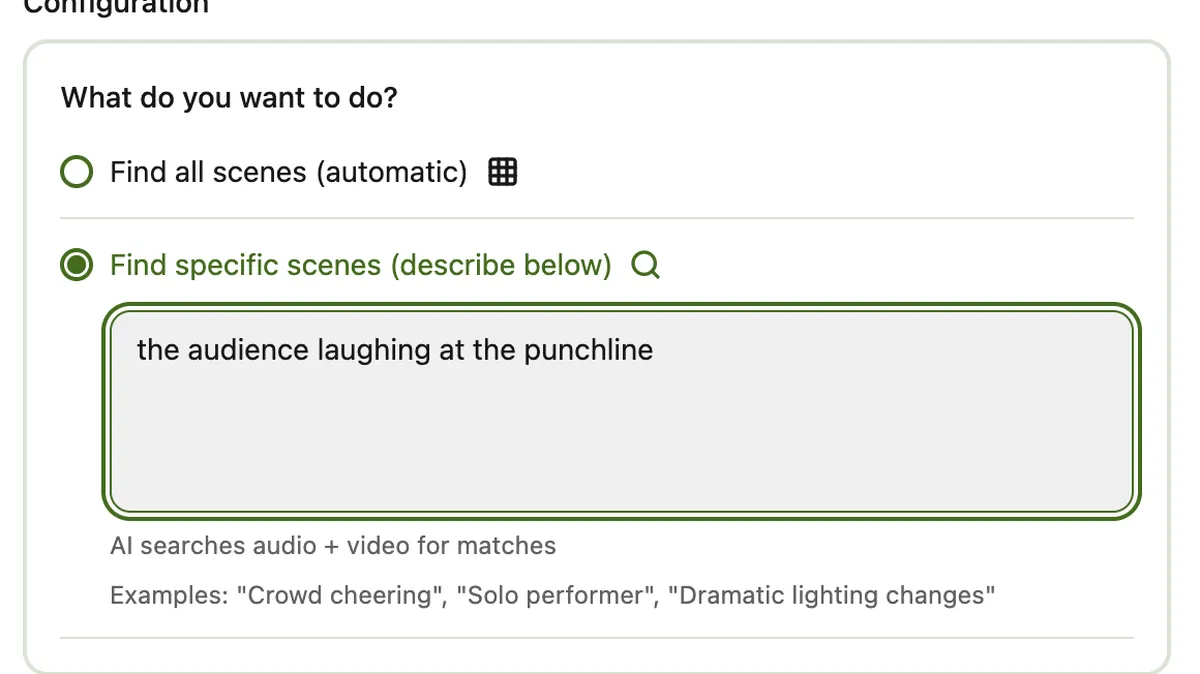
Then search for the shots every couple expects. Type the moment in plain words, and ClipMaster searches the picture and the sound together:
- "bride walking down the aisle"
- "ring on the finger"
- "first kiss"
- "dad crying"
- "first dance spin"
- "confetti" or "sparklers"
That is semantic video search: it looks for what the moment is, not for a word someone said.
Step 3: Build the Teaser Across Every Camera
A teaser needs shots from several files. ClipMaster compilations pull clips from all your projects, not just one video, so the second shooter's angle of the kiss and the drone shot of the venue can sit in the same edit. On a paid plan:
- Start a compilation and describe it: "romantic teaser, slow, the vows and the kiss, ends on the exit".
- The AI proposes a line-up with its reasoning and the total length.
- Let it cut the edit as a Trailer (built to tease) or a Best-of.
- Drag scenes into order, trim each one, or put two angles side by side in a split-screen scene.
Full walkthrough: how to make a compilation video.
Step 4: Slow Motion, Text and Music in One Click
Press Auto-edit on the compilation and tell it the mood ("soft, cinematic, gold tones"). It fills in what is still empty:
- Speed: slows down the big moment and speeds up dead air. You can also set any stretch yourself, from 0.25× to 4×.
- Text cards: the couple's names and the date, with font, size, position and timing.
- A background track, plus a beat pattern on a scene if you want cuts that hit the music.
- Transitions between scenes and screen effects such as light leak, cinema bars or sepia.
Don't like the take? Shuffle gives you another one, and Undo takes back exactly what it added.
Step 5: Speeches With Captions People Can Read
For a toast clip, captions matter: guests watch on mute. Pick one of 15 caption styles, then click any word to fix a name the transcription got wrong ("Aoife", "Siobhán", the groom's nickname). For a wedding with two languages, paid plans add a second caption line translated into one of 21 languages, so both families can follow. More on why this matters: do captions increase video views?
Step 6: Frame It for Phones and Export
Wide ceremony shots lose the couple when cropped to vertical. On a paid plan, Analyze layout picks a layout per shot: Focus follows one person, Split stacks two people, and Fit shows the whole wide frame over a blurred copy so nothing is cut off. Export 9:16 for Reels and TikTok, 16:9 for the couple's full teaser, or 1:1, at 1080p.
If you post your work on YouTube, schedule the Shorts from the same place: ClipMaster renders each one before its slot and writes the title, description and hashtags.
Tips From the Edit Bay
- Post a moment, not a recap. One clip of the dad seeing his daughter beats a 60-second summary of the day.
- Lead with the payoff. Start on the kiss or the cheer, then show how they got there.
- Ask before you post. Get the couple's OK for social use in your contract.
- Keep the music legal. Use the built-in track, or a song you have the rights to.
FAQ
Can AI make a wedding highlight video from raw footage?
Yes, for the first cut. ClipMaster finds the moments from the picture and sound, builds a Trailer or Best-of across all your camera files, and adds slow motion, text and music. You review and adjust before it goes to the couple.
Does it work when nobody is talking in the footage?
Yes. It reads what happens on screen, so a silent walk down the aisle or a confetti exit is found the same way a speech is.
How long can each video file be?
Up to 90 minutes and 5 GB per file, on every plan, and you can upload many files at once.
What does it cost for a wedding?
1 token = 1 minute of footage. Six hours of footage is 360 minutes: the Pro plan ($49 a month) includes 600 minutes, and unused minutes roll over. New accounts get 5 free minutes to try it. See pricing.
Can I keep editing in Premiere or DaVinci?
Yes. Export the clips and finish the full film in your editor. ClipMaster takes care of finding the moments and the quick social cuts. See also ClipMaster vs DaVinci Resolve and how ClipMaster works.