How to Turn Workout Videos Into Fitness Shorts
You're a coach, a trainer or a gym. You film full classes, follow-along workouts, client sessions and form breakdowns. Every one of them holds five or six great short clips: a perfect rep, a cue that clicks, a client's PR, the move people always get wrong. Cutting them out by hand is an evening you don't have.
There's also a reason to bother. When researchers at Flinders University looked at 200 TikTok fitness videos, 60% contained incorrect or harmful information. A qualified coach posting correct, clear form clips stands out. This guide shows how to get those clips out of the footage you already have.
The Short Answer
- Upload the class or session (up to 90 minutes per file).
- Search for the moves: "squat from the side", "plank hold", "client hits a PR".
- Slow down the rep, follow the athlete in vertical, caption the cues.
- Build a Countdown ("5 moves for…") or a Tutorial from several sessions, with text cards for each move.
- Schedule a week of Shorts to YouTube in one sitting.
Clips That Work for Fitness
| Format | Example | In ClipMaster |
|---|---|---|
| Countdown | "5 moves for a stronger core" | Compilation, Countdown, text card per move |
| Form fix | The wrong rep, then the right one | Split-screen scene, slow motion |
| Follow-along | A 60-second finisher | Compilation, Tutorial, progress bar |
| The moment | A client's PR, the class cheering | One Hot clip, zoom, sound effect |
| Coaching cue | "Push the floor away" | One clip, captions with the cue |
Step 1: Upload the Session
Upload MP4, MOV or AVI files up to 90 minutes and 5 GB each, several at once. Most workout footage has music and a few shouted cues, not a clean conversation. That is fine: ClipMaster finds moments from the picture, not just the transcript, and it hears the cheering and the loud moments too.
Step 2: Find Each Move
Every clip comes back labelled: a virality tier (Hot, Warm or Neutral), a type (Highlight, Story, How-to, Transition) and a description. Filter to How-to for the teaching moments. Then search for the moves in plain words:
- "deadlift from the side"
- "burpees, whole class"
- "coach demonstrates the wrong form"
- "client hits a PR and the gym cheers"
ClipMaster searches what is on screen and in the audio together, so you get the move even if nobody named it. More: semantic video search.
Step 3: Make the Form Easy to See
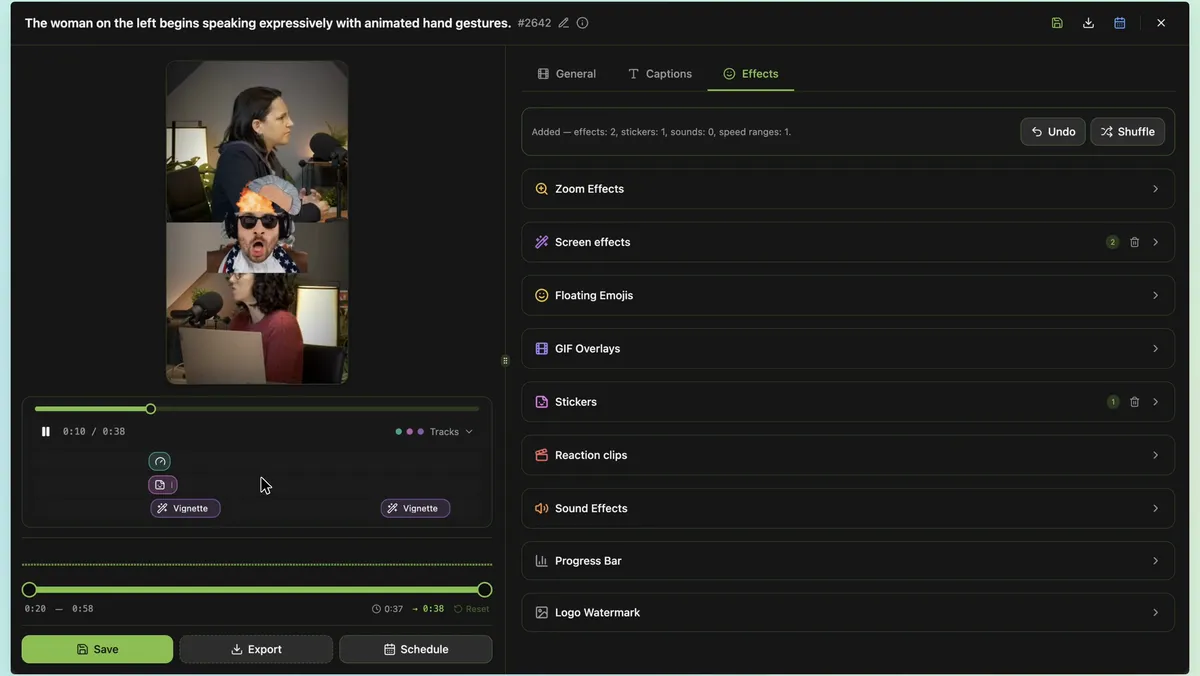
- Slow motion: play only the rep at 0.25× to 0.5× and the rest at normal speed. On paid plans, AI suggests where.
- Vertical framing (paid plans): Focus follows one athlete and holds still when they barely move, so a squat doesn't wobble. Fit keeps the whole class in frame.
- Zoom: punch in on the knees or the bar path, aimed at any of 9 points.
- Stickers: up to 5 per clip, and they can follow a face.
- Captions: 15 styles; click a word to fix it, drop 💪 or 🔥 on it. Paid plans add a translated second line in one of 21 languages for clients abroad.
Or press Auto-edit (paid plans) and say "high energy, bold text": it places zooms, effects, stickers, sounds and speed changes in one click, spaced so they don't crowd.
Step 4: Build a Countdown or a Tutorial
Compilations (paid plans) pull clips from every project you have, so the best squat from Monday and the best lunge from Thursday can sit in one video. Describe it ("5 beginner core moves, easiest first") and let the AI cut it as a Countdown, or pick the Tutorial structure: the result first, then numbered steps. Auto-edit adds text cards with each move's name, a background track and a progress bar so viewers know how long is left.
Put the wrong rep and the right rep side by side in a split-screen scene for a form-fix clip. Step by step: how to make a compilation video.
Step 5: Schedule the Week
Connect your YouTube channel (paid plans), pick seven clips and seven slots. ClipMaster renders each before its time, writes the title, description and hashtags, and shows the week on a calendar. On a paid plan you can also do this from Claude or ChatGPT in one message: see the recipe to schedule a week of YouTube Shorts.
FAQ
How do I turn a workout class into short videos?
Upload the recording to ClipMaster, search for each move by describing it, slow down the reps and frame them for vertical. Build a Countdown or Tutorial compilation with text cards, then schedule the clips to YouTube or export them for TikTok and Instagram.
Does it work on footage with loud music and no talking?
Yes. It reads the picture as well as the audio and the transcript, so it finds the moves and the big moments even without speech.
Can I add the exercise names on screen?
Yes. In a compilation, text cards show each move's name with your choice of font, size, position and timing, and Auto-edit can write them for you. On a single clip, use captions.
What does it cost?
1 token = 1 minute of footage. A 60-minute class uses 60 tokens; Creator is $19 a month for 200 minutes, and unused minutes never expire. New accounts get 5 free minutes. See pricing and how ClipMaster works.